Adjustment Tool (Song)
Original article: CeVIO AI ユーザーズガイド ┃ 調整ツール(ソング)


Switch the edit mode of the Song Track.
Click on the text above the button (e.g. "PIT") to display other screens superimposed on the current adjustment screen.
(It cannot be used in the Talk Track or Audio Track.)
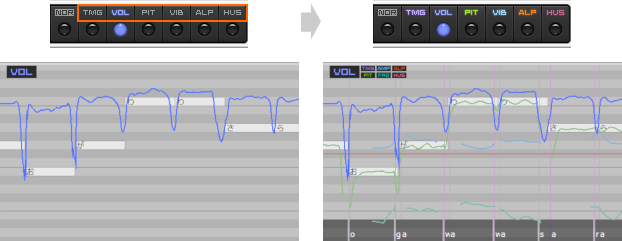
Edit Score
Edit the score by adding notes, deleting notes, etc.
Edit Timing
Adjust the timing of the vocalization.
Edit Volume
Adjust the volume of the note.
Edit Pitch
Adjust the pitch of a note.
* Outside of the pitch adjustment page, when the pitch is superimposed, the pitch affected by the vibrato will also be displayed.
* In the pitch adjustment page, when the vibrato is superimposed, the pitch affected by the vibrato will also be displayed.
Edit Vibrato
Adjust the vibrato amplitude and frequency here.
Edit Alpha Detail
Adjust the more detailed variation of timbre within a track.
Edit Husky Detail
Adjust the more detailed variation of husky within a track.